
Translation
Translating the captions into another language: turning the translator on, the language pair, sentence-by-sentence translation and the translation band.
Translation sends every final caption sentence to the translator server and shows the version in the chosen language under the original, in a band of its own. Translation is also the basis of interpreting: what the interpreter speaks is this translated sentence.
What you need
- A reachable translator server (
translatorserver) – on your machine or on the network. Its address and key are on the Servers tab of the settings window; the setup steps are in the First start and connecting to the servers chapter. - Running captions: translation only works alongside captions. The caption source can be the Whisper server or the system's Live Captions.
Turning translation on
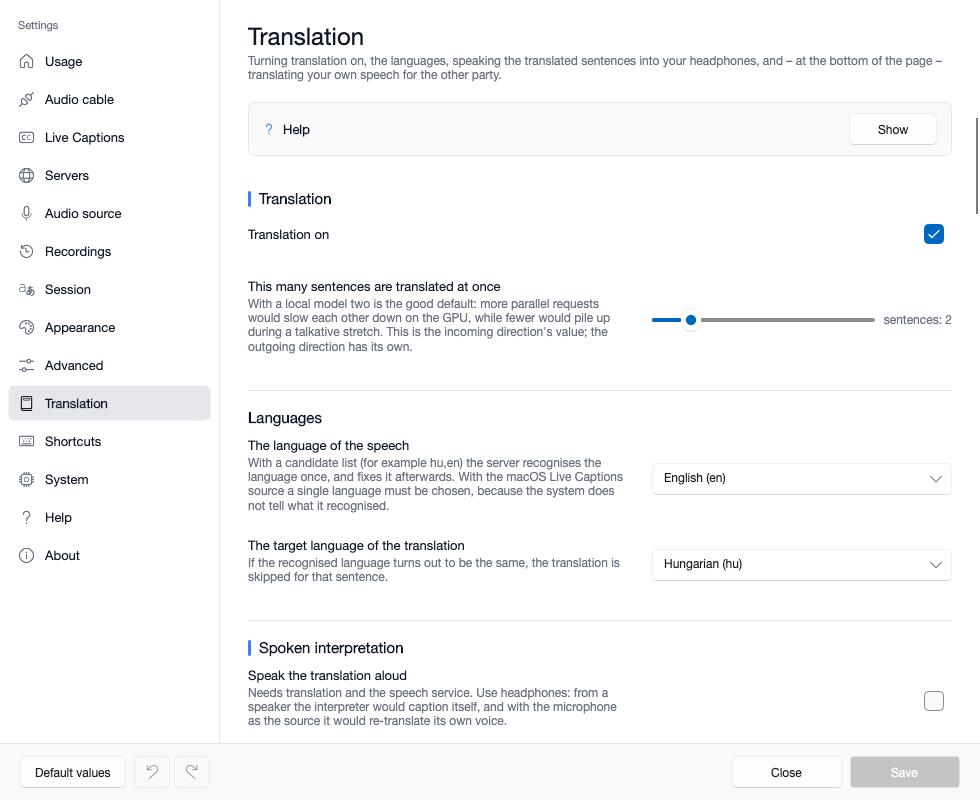
In the Translation section of the settings window's Translation tab, the Translation on switch starts it: from then on the final sentences go to the translator and appear in the translation band. The translation icon on the caption window's purple Translation and interpreting icon row does the same while running.
The Ctrl+Alt+T hotkey (on macOS Control+Option+T) does not switch translation; it hides and shows the translation band: translation keeps running in the meantime, it is just not visible.
The language pair
The two fields of the Languages section are the heart of the app: the recogniser, the translator and the interpreter all work from this pair.
| Field | What it means |
|---|---|
| The language of the speech | what the speaker says: a fixed language, a candidate list (for example hu,en) or automatic detection – details in the Caption sources and the speech language chapter |
| The target language of the translation | what the app translates into, and the language the interpreter speaks |
If the recognised language is the same as the target language, translation of that sentence is skipped – on purpose. With a candidate list, this means that in a bilingual conversation only the foreign-language sentences are translated.
The language picker on the caption window's Incoming audio icon row sets the speech language while running; the target language is chosen on the Translation tab. At the top of the Translation and interpreting panel the language pair (for example EN → HU) shows the current setting.
How the app translates
- Sentence by sentence: the app assembles a sentence from the final segments – at sentence-ending punctuation, or forced after 1.5 seconds at the latest – and sends one sentence at a time to the translator. The translation therefore always arrives after the end of the sentence.
- When it piles up, old sentences are dropped: if the translator is slower than the speech, at most 8 sentences can wait in the queue; beyond that the oldest one is marked "skipped". A translation that arrives late is more misleading than a missing one.
- This many sentences are translated at once: the number of parallel requests. With a local translation model two is the right default – more would slow each other down on the graphics card, fewer would pile up during a talkative stretch. Only worth raising for a powerful external endpoint. This is the incoming direction's value; the outgoing direction has its own (see the In calls: virtual cable, outgoing direction chapter).
Translation in the caption window
The translated sentence appears under the original, in its own band, with its own font size, colour and line count. These are set on the caption window's Translation and interpreting panel (the gear of the purple icon row): Size, the colour, bold, italic, outline, alignment and Lines. Whether the translation band goes on top is an appearance setting. The panel and the bands are covered in The caption window and the toolbar chapter.
The status line at the bottom of the panel tells you whether translation is running – for example "The captioning is stopped, there is no translation" when captions are stopped.
If something is wrong
| Symptom | Likely cause | What to do |
|---|---|---|
| captions come, translation does not | translation is off, or the translator cannot be reached | turn translation on; check the status dot and the translator's address and key on the Servers tab |
| some sentences have no translation | the recognised language equals the target language | intended; if it should not be, set the speech language exactly |
| sentences marked "skipped" | the translator is slower than the speech | a more powerful translation machine, or more parallel sentences with an external endpoint |
| the translation comes too late | long sentences, a high sentence boundary | the Fast segmentation profile – see the chapter on segmentation |
| odd, mistranslated sentences | a wrong speech language already spoils the captions | fix the speech language; the translation is only as good as the captions |
Where next
- Interpreting and your own voice sample – the translation spoken aloud
- Segmentation and accuracy – faster or more accurate sentences