
Segmentation and accuracy
How the app splits speech into sentences, what the segmentation modes and profiles mean, and which values improve caption accuracy.
The Whisper server does not write continuously, word by word, but in segments: the app cuts the speech into pieces and transcribes each piece as a whole. Where a segment ends determines both how fast and how accurate the captions are. This chapter explains how the segment boundary is decided, and what to adjust when captions lag, flicker or come out cut off.
The chapter only applies to the Whisper server source: with the system's Live Captions the system schedules recognition, and the segmentation controls are disabled.
How speech becomes a sentence
- The app watches the audio and uses a speech detection threshold to decide when someone is speaking.
- While speech continues, the segment stays open. After a while the preview text appears – a temporary version of the sentence that is still changing – and it is updated regularly.
- When a long enough silence occurs in the speech (the sentence boundary), or the segment reaches the longest segment length, the segment closes. The server then delivers the final text.
- The final sentence goes on to translation and – if it is on – interpreting.
With a speaker who talks at length without pausing, you can close the open sentence by hand: the close the open sentence now hotkey (Ctrl+Alt+Enter, on macOS Control+Option+Enter) finalises it at once, so translation does not wait for the end of the sentence.
The three segmentation modes
| Mode (in the UI) | What it does | When it fits |
|---|---|---|
| Hybrid (default) | segment boundaries follow pauses in the speech, with preview text in between | almost always; recommended |
| VAD | final text only, after the segment closes; no preview text | when the flickering preview text is distracting |
| Interval | fixed time windows, bypassing speech detection | when speech detection does not work on an audio source (for example a noisy, continuous background) |
Hybrid is the default because in a real talk the speech stretches are 9–28 seconds long: that is too long to wait without any text. By default the preview text appears after 2 seconds of speech and is refreshed every second.
The three timings and the profiles
The three most important segmentation values:
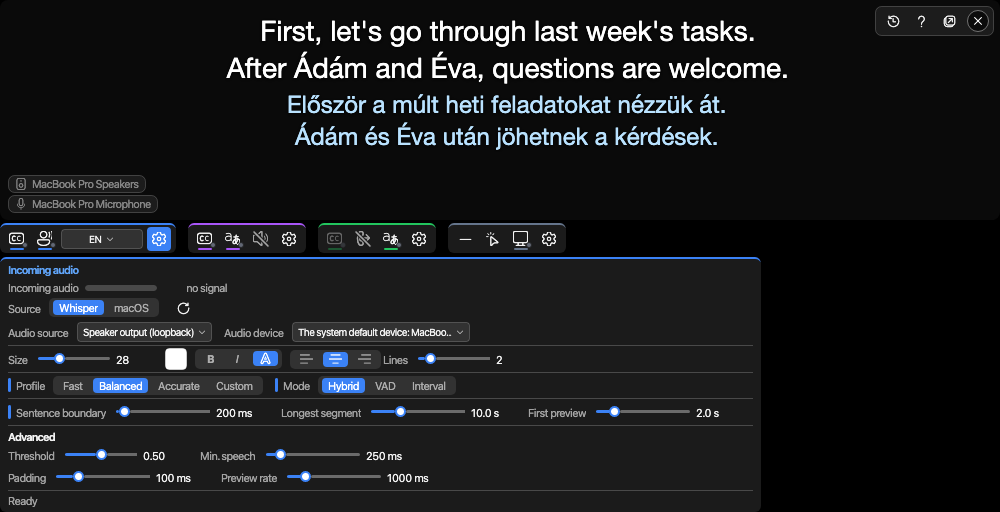
- Sentence boundary – this much silence (in milliseconds) closes the sentence. Lower: shorter sentences, faster translation; higher: more context.
- Longest segment – after this long the sentence closes even without silence.
- First preview – after this much speech the first preview text appears.
The three values can also be chosen together as a profile. A profile does not touch the mode; if the three values match none of the profiles, the picker shows "Custom".
| Profile | Sentence boundary | Longest segment | First preview | When |
|---|---|---|---|---|
| Fast | 150 ms | 6 s | 1 s | chatting: short sentences, quick preview text |
| Balanced (default) | 200 ms | 10 s | 2 s | the measured defaults; good for most situations |
| Accurate | 400 ms | 15 s | 3 s | a talk: longer segments, more context for the translator |
Where to set them
- On the caption window's Incoming audio panel (the gear of the blue icon row): the Profile and Mode rows and the three sliders – they take effect while running, without a restart. This is the place to experiment: the effect shows on the very next sentence.
- On the Session tab of the settings window: the same values, together with the model; the tab is described in the Session, Advanced, System, About chapter.
The model
On the Session tab of the settings window, the Model field selects the Whisper model; left empty, the server's live default model is used. The list also contains quantised variants (for example large-v3-turbo-q5_0): models with compressed weights that take less video memory, at the cost of a hair less accuracy – measured 95.5 % instead of 95.7 %, from 2.8 times less memory. A good trade on a small graphics card.
The previous sentence as context
When Previous sentence as context is on, the recogniser also receives the previous sentence. This can help keep names and technical terms consistent, but a misheard word can also be carried forward this way. Off by default; worth trying for a talk full of technical terms.
The advanced values
The Advanced row of the Incoming audio panel and the Advanced tab of the settings window hold the values you rarely need to touch. They are measured defaults; a bad value does not cause an error but cut-off words or missing sentences – if you see that, look here.
| Value (on the panel) | What it means | When to touch it |
|---|---|---|
| Threshold | how strong a signal counts as speech | raise it for a noisy call (fewer false segments), lower it for a quiet speaker (fewer lost words) |
| Min. speech | sound shorter than this is not a segment – filters out coughs and clicks | lower it if short words get lost |
| Padding | how much is kept before the start and after the end of a segment (100 ms by default) | raise it if the start or end of words is cut off |
| Preview rate | how often the preview text is refreshed | slow it down if the flicker bothers you |
| Step, window, overlap | the fixed windows of Interval mode | only matter in Interval mode |
The Default values button at the bottom of the settings window resets these to the measured defaults as well.
Separate segmentation for the outgoing direction
If you also translate your own speech into the call (the outgoing direction), its goal is different: speed, because the other party hears silence while the translation is being made. On the Translation tab of the settings window, the Separate segmentation for the outgoing direction switch gives the outgoing direction its own values – starting from the Fast profile when turned on. The model stays shared. On the caption window's Outgoing direction panel the outgoing values can be set separately; the Shared profile goes back to the shared segmentation.
Symptom and remedy
| What you see | What to try |
|---|---|
| translation lags well behind the end of the sentence | the Fast profile, or a lower sentence boundary |
| sentences are too short and the translation is choppy | the Accurate profile, or a higher sentence boundary |
| the preview text flickers and distracts | VAD mode, or a slower preview rate |
| the start or end of words is lost | more padding |
| made-up, meaningless sentences appear in noise | a higher threshold |
| sentences are missed with a quiet speaker | a lower threshold |
| no captions at all on an audio source although there is a signal | Interval mode |
Where next
- Caption sources and the speech language – the source and the language
- Translation – what happens to the final sentence